MNML Volume Pricing gives you several controls to restrict volume discounts to specific customers or scenarios.
You can:
Limit volume pricing to selected customers
Control how it stacks with other discounts
Prevent it from applying to sale items or subscriptions
Hide volume pricing from certain customers while keeping it active
These settings work together to give you precise control over when volume pricing applies.
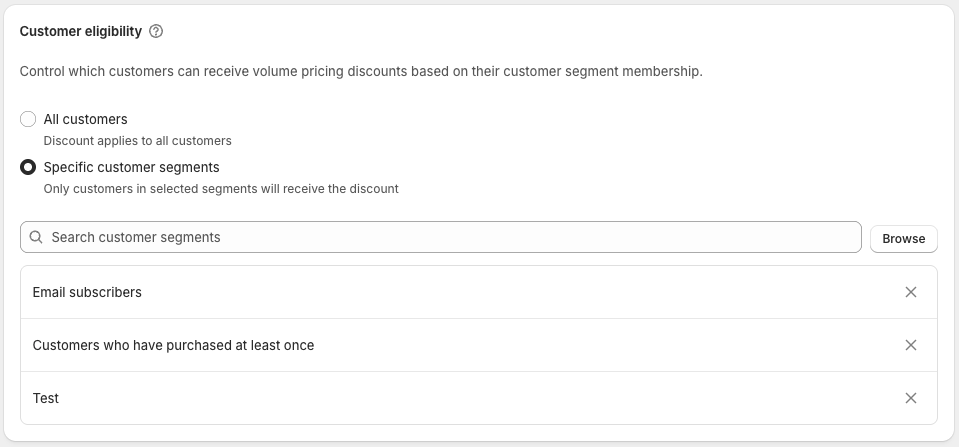
Control who actually receives the discount in cart and checkout.
All customers
Every customer can receive volume pricing when they meet the quantity requirement.
Specific customer segments
Only customers in the selected Shopify customer segments will receive volume pricing.
All other customers will pay standard pricing, even if they buy in bulk.
Typical use cases:
Wholesale-only pricing
Trade customers
VIP or loyalty members
Customer segments are managed in Shopify and stay automatically in sync.

Prevent specific customers from ever receiving volume pricing, even when they match the eligibility setting above.
How to set it up
In the app, open Settings → Customer eligibility → Always exclude
Enter one or more customer tags (comma or space separated)
In Shopify, add one of those tags to the customer
Any logged-in customer with a matching tag will never receive volume pricing - in the cart, at checkout, or on draft orders. Guest checkouts are not affected. Tag matching is not case sensitive.
When to use this
Draft orders with custom prices. If you override line item prices on a draft order, Shopify can repeatedly re-apply volume pricing and ask you to re-save the order before the customer can pay. Excluding that customer prevents the loop.
Customers with negotiated or contract pricing who should never receive additional volume discounts.
Exclusion always takes priority: it overrides customer eligibility, and it works in both Discount and Price Update modes.
Control who can see the volume pricing widget on product pages. This affects visibility only, not whether the discount applies.
Open Online Store → Themes → Customise
Open the Volume Pricing Widget or Volume Pricing Subtotal app block
Enter customer tags in the Hide widget by customer tag field
Save changes
Enter customer tags as a comma-separated list
Tag matching is not case sensitive
If a customer has any matching tag, the widget is hidden
Example:
retail, guest, wholesale-liteCustomer eligibility controls whether the discount applies
Widget visibility controls whether pricing is shown
A customer may:
Not see volume pricing but still receive the discount
See volume pricing but not qualify for the discount
Wholesale-only volume pricing
Restrict eligibility to wholesale customers
Hide the widget from retail customers