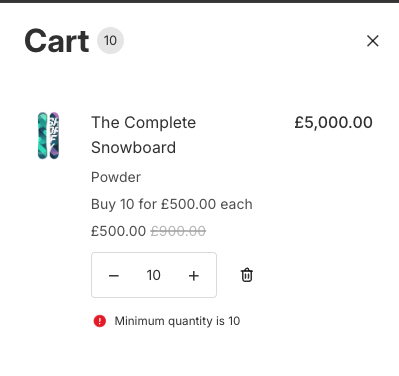

When you set up volume pricing tiers, your lowest tier already defines the smallest quantity a customer should order. The minimum product quantity feature enforces this; customers can't check out with fewer than the lowest tier quantity for any volume-priced product.
This is a per-product rule, not a cart total. If a product's lowest tier is "Buy 10+", then a customer must add at least 10 of that product. Other products in the cart are unaffected unless they also have volume pricing tiers.
Enforcement works across all Shopify checkout surfaces:
Online store cart
Checkout page
Express checkouts (Shop Pay, PayPal, Google Pay, Apple Pay)
Headless storefronts using the Storefront API
On product pages, the app also sets the quantity input's minimum value so that stepper buttons won't go below the required quantity.
How to Enable Minimum Product Quantity
Open the MNML Volume Pricing app
Click Settings in the top navigation bar
Find the Minimum quantity section
Toggle on Enforce minimum product quantity
Customise the Validation message (optional)
Click Save Changes
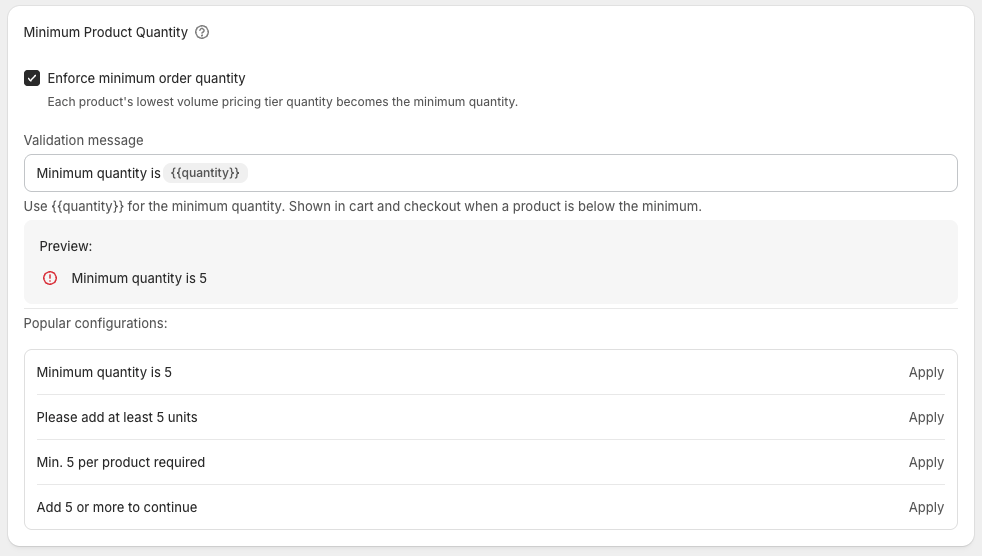
The app automatically creates and activates a checkout validation rule in your Shopify store. No additional setup is needed.
Validation Message
When a customer tries to check out with fewer than the minimum quantity, they see a validation error. You can customise this message in the settings area.
The error message is shown in your theme’s error message style.